
On this page
- 01Layer 1: can Google reach the site at all?
- 02Layer 2: is the right set of pages indexed?
- 03Layer 3: how many versions of each page exist?
- 04Layer 4: redirects and the links that feed them
- 05Layer 5: architecture and internal linking
- 06Layer 6: on-page fundamentals across every URL
- 07Layer 7: structured data
- 08Layer 8: speed and Core Web Vitals
- 09Layer 9: local and entity signals
- 10The tools you actually need
- 11Technical SEO audit template (copy-ready)
- 12How often to run this
- 13Frequently asked questions
- 14Related guides
Most Indian websites that “are not ranking” do not have a content problem. They have a plumbing problem — a robots.txt that blocks nothing because of a stray character, four versions of the same URL competing with each other, a blog page linking to eleven URLs that redirect somewhere else. None of it is visible in the browser, all of it is visible to Google.
Short answer: a technical SEO audit checks whether Google can crawl your site, whether it chooses to index the right pages, whether those pages are unique, fast and understandable, and whether the signals you send agree with each other. Everything else — content, links, ads — sits on top of that. This is the checklist I run, in the order I run it.
Work top to bottom. There is no point rewriting a title tag on a page that is blocked from crawling, and no point publishing content on a site where every archive duplicates every post.
Layer 1: can Google reach the site at all?
Open yoursite.com/robots.txt in a browser and read it line by line. The single most common serious fault I find is a rule block with no valid User-agent line above it — often because someone commented it out while testing and never restored it. Every rule below an invalid or missing user-agent declaration belongs to no crawler group, and the file effectively does nothing.
Check for the opposite failure too: a Disallow: / left over from a staging site, which blocks everything. Then confirm the file actually exists on the server. On many hosts a plugin’s robots.txt editor will happily save a file that is never served, because a physical file on disk takes priority. Test by loading the URL, not by trusting the plugin.
- Valid
User-agent: *group, not commented out - Admin, login and system paths disallowed; CSS and JS explicitly allowed so Google can render pages
- Internal search results and tracking parameters disallowed to protect crawl budget
- Sitemap declared with its absolute URL
- Server returns 200 for the file and it is plain text
Layer 2: is the right set of pages indexed?
Compare three numbers: URLs in your XML sitemap, pages reported as indexed in Google Search Console, and pages you actually want ranking. On a healthy small business site those numbers are close. When the sitemap has thirty-four URLs and the business has eighteen real pages, the difference is usually archives, tag pages, attachment pages and duplicates quietly competing with the pages that matter.
- Date, tag and author archives noindexed or disabled unless they earn traffic
- Empty or near-empty category archives noindexed and removed from the sitemap
- Attachment and media pages redirected to the file or disabled
- Search results pages noindexed
- Every URL in the sitemap returns 200 and is self-canonical — a sitemap should never contain a redirect or a noindexed page
- 404 page returns a genuine 404 status and carries
noindex
Layer 3: how many versions of each page exist?
Every page on a WordPress site can usually be reached at four addresses: with and without www, over HTTP and HTTPS, with and without a trailing slash, and often with an index.php or query-string variant on top. Google will pick one, but you want to make the choice for it.
Test each variant by hand and watch where it lands. All of them should end on the same canonical URL with a single 301 — not a chain of two or three. Then check that the rel=canonical tag on the page points at itself, not at the homepage, and not at a variant.
Layer 4: redirects and the links that feed them
Redirects are not the problem; internal links pointing at redirects are. If your blog listing links to eleven old posts that all 301 somewhere else, Google spends its crawl allowance following hops instead of reading new content, and each hop leaks a little authority.
- Crawl the site and list every internal link whose destination is not a 200
- Update those links to point at the final URL
- Collapse redirect chains to a single hop
- Check for orphan directories sitting outside the CMS — a leftover folder on the server can shadow a real page and serve a host’s default placeholder with a 200 status
Layer 5: architecture and internal linking
Internal links are the cheapest ranking lever most sites never pull. A blog post with one internal link, pointing at the homepage, tells Google almost nothing about what the site is for. Ten contextual links into the relevant service pages tell it a great deal.
- Every money page reachable within three clicks of the homepage
- Each article links contextually to at least two service pages and two related articles
- Anchor text descriptive rather than “click here”
- No page with zero internal links pointing to it
- Pagination either handled properly or eliminated — a paginated URL that shows the same posts as page one is duplicate content
Layer 6: on-page fundamentals across every URL
Audit these in bulk rather than page by page. Export every indexable URL and check the same fields across all of them; the failures cluster.
| Element | What to check | Common failure |
|---|---|---|
| Title tag | Unique, under about 60 characters, primary keyword near the front | Duplicates across service pages |
| Meta description | Unique, 140–158 characters, written to be clicked | Missing entirely on archives |
| H1 | Exactly one per page | Two, when a template prints the title and the content repeats it |
| Heading order | No skipped levels | H1 straight to H3 |
| Image alt text | Descriptive on every meaningful image | Empty on all uploaded images |
| Canonical | Self-referencing and absolute | Points at the homepage |
Layer 7: structured data
Schema will not make a bad page rank, but it makes a good page legible to search engines and to AI answer systems, which increasingly decide what to quote based on what they can parse confidently.
- Organization or LocalBusiness on the site, with consistent name, phone and address
- BreadcrumbList on every page
- Article with a real author Person on every post — and the same Person entity reused site-wide, with
sameAspointing at profiles that confirm the identity - Service or Product schema on commercial pages
- FAQPage only where visible questions and answers genuinely exist on the page
- Every JSON-LD block parses without error, and no two blocks contradict each other
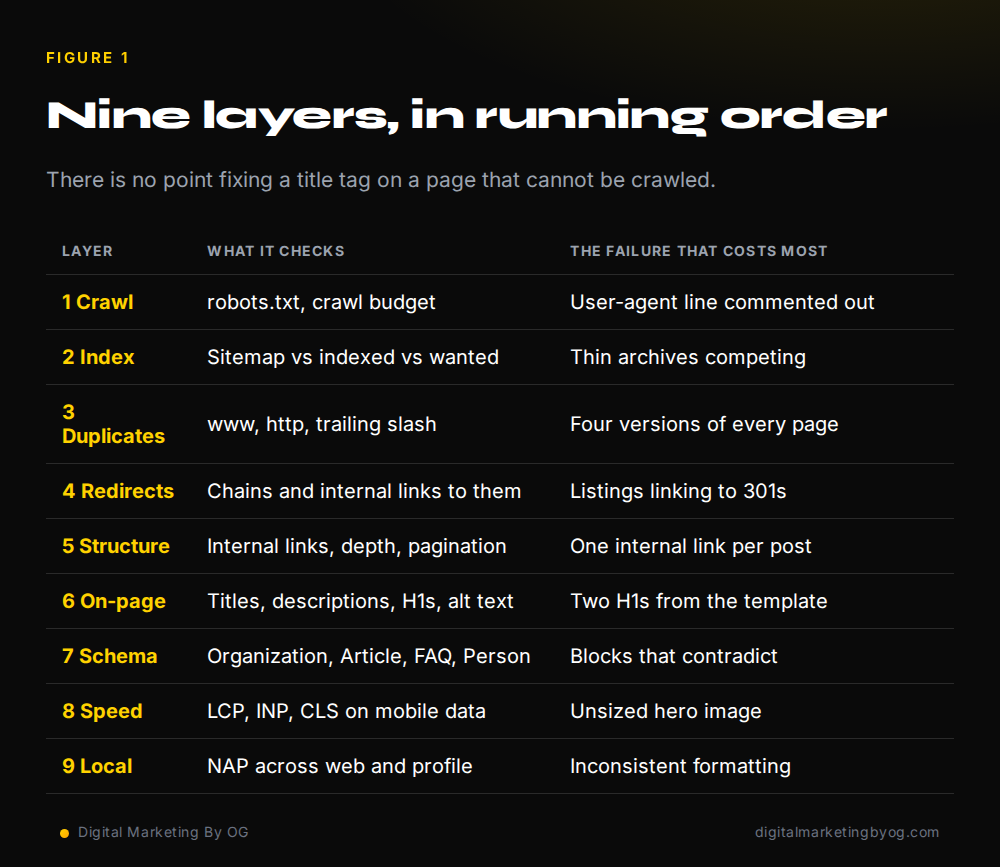
Layer 8: speed and Core Web Vitals
Test on a mid-range Android phone on mobile data, not on your laptop. In India that is what most of your traffic actually is. The three metrics that matter are largest contentful paint, interaction to next paint and cumulative layout shift.
- Hero image compressed, correctly sized and preloaded; everything below the fold lazy-loaded
- Width and height set on every image so the layout does not jump
- Unused plugin CSS and JS dequeued from pages that do not need them
- Fonts served with
display=swapand preconnected - Page caching on, with a purge that actually runs when content changes
- A single accumulated stylesheet, not forty layers of overrides added over time
Layer 9: local and entity signals
For any business serving a specific city, this layer often moves rankings faster than anything on the site itself. Name, address and phone number must match exactly across the website, the Google Business Profile and every directory listing. Inconsistency here is why businesses with good sites still miss the map pack. Our branding and local SEO work starts with exactly this reconciliation.
The tools you actually need
Google Search Console is non-negotiable and free — coverage, page indexing and Core Web Vitals reports are the ground truth. PageSpeed Insights for field data. Any crawler for the site-wide sweep. A schema validator for structured data. Paid tools like Ahrefs or SEMrush help with keywords and links, but no paid tool tells you anything about your own site that Search Console will not.
Technical SEO audit template (copy-ready)
Use this template to record each check as you run the audit. Copy the table into Google Sheets or Excel, mark every row Pass or Fix, give each fix a priority, and work through High items first. Re-run the same template after fixes go live so you can show what changed.
Layers 1 to 5: crawl, index and site structure
| Layer | Check | Tool | Status | Priority |
|---|---|---|---|---|
| 1. Access | robots.txt allows key sections; no accidental Disallow; sitemap URL listed | robots.txt, Search Console robots report | Pass / Fix | High / Med / Low |
| 1. Access | Server returns 200 for key pages; no 5xx errors | Crawler (e.g. Screaming Frog), Search Console | Pass / Fix | High / Med / Low |
| 2. Indexation | XML sitemap contains only 200, indexable, canonical URLs | Sitemap, crawler | Pass / Fix | High / Med / Low |
| 2. Indexation | Page indexing report reviewed; important pages indexed | Search Console | Pass / Fix | High / Med / Low |
| 3. Duplicates | One version of each URL: HTTPS, www or non-www, trailing slash | Crawler, browser | Pass / Fix | High / Med / Low |
| 3. Duplicates | Canonical tags self-reference or point to the right page | Crawler | Pass / Fix | High / Med / Low |
| 4. Redirects | No redirect chains or loops; old URLs 301 to closest match | Crawler | Pass / Fix | High / Med / Low |
| 4. Redirects | Internal links point to final URLs, not redirects or 404s | Crawler | Pass / Fix | High / Med / Low |
| 5. Architecture | Key pages within three clicks of home; no orphan pages | Crawler, sitemap comparison | Pass / Fix | High / Med / Low |
Layers 6 to 9: on-page, schema, speed and local
| Layer | Check | Tool | Status | Priority |
|---|---|---|---|---|
| 6. On-page | Unique title and meta description per page; one H1 | Crawler | Pass / Fix | High / Med / Low |
| 6. On-page | Images have descriptive alt text and sensible file sizes | Crawler, PageSpeed Insights | Pass / Fix | High / Med / Low |
| 7. Structured data | Organization, WebSite, Article/Product/LocalBusiness valid and matching visible content | Rich Results Test, Schema validator | Pass / Fix | High / Med / Low |
| 8. Speed | Core Web Vitals pass for mobile (LCP ≤ 2.5 s, INP ≤ 200 ms, CLS ≤ 0.1) | Search Console, PageSpeed Insights | Pass / Fix | High / Med / Low |
| 9. Local and entity | Business name, phone and details consistent across site, Business Profile and listings | Business Profile, manual check | Pass / Fix | High / Med / Low |
Want this done for you? Our SEO services start with exactly this audit, or request a free technical SEO audit. For online stores, pair it with our e-commerce SEO guide; if the site gets traffic but no enquiries, see why websites fail to generate leads.
How often to run this
A full audit twice a year for a small site, quarterly if you publish weekly, and immediately after any migration, redesign, plugin change or hosting move. Between audits, check Search Console’s page indexing report monthly — it is the early warning system for everything on this list. If a redesign is coming, follow our website redesign SEO checklist before launch.
Frequently asked questions
What is a technical SEO audit?
A technical SEO audit is a structured check of whether search engines can crawl, index, understand and quickly render your website. It covers robots.txt and sitemaps, indexation and duplicate URLs, redirects, internal linking, on-page tags, structured data, Core Web Vitals and local signals. Crucially, it does not judge whether your content is good — it establishes whether good content would even be seen.
How long does a technical SEO audit take?
For a site under fifty pages, one to two days to audit properly and one to three days to implement the fixes. Larger or multi-location sites take a week. Most of the time goes on implementation, not on finding the problems.
Can I do a technical SEO audit myself?
You can do most of the diagnosis yourself with Search Console and a browser: read robots.txt, test URL variants, check canonical tags, count H1s, look at the indexing report. Implementation is where it gets harder, because fixing redirects, schema and page speed usually needs server or template access.
Which technical SEO issue costs the most traffic?
Indexation problems, by a wide margin. A page that is not indexed cannot rank at any position, so a broken robots.txt, an accidental noindex or a canonical pointing at the wrong URL will cost more traffic than every title tag on the site combined.
Does technical SEO still matter if my content is good?
More than before. As answer engines and AI Overviews take a larger share of queries, being parseable, fast and unambiguous is what decides whether your page is the one quoted. Good content on a broken site is invisible content.

Yatin Chaudhary
BBA · MBA · AI & ML
Yatin Chaudhary is the founder of Digital Marketing By OG and a Delhi NCR-based digital marketing specialist (BBA, MBA, AI & ML). Since 2022 he has run SEO, Google Ads, Meta Ads and LinkedIn Ads for brands in healthcare, nutrition, real estate, education and IT services, and builds the WordPress sites those campaigns send traffic to.
- Technical SEO
- Local SEO
- Google Ads
- Meta Ads
- LinkedIn Ads
- Lead generation
- WordPress development
- Conversion optimisation
Selected work: exuverse.com and exuversespaces.com (design, build and SEO), an HRMS portal, GST billing software and paid campaigns across India, the US and the UK.
Ready to grow your business online?
Websites, SEO, ads and complete digital setups, built by the team that wrote this. Tell us what you are trying to achieve.

SEO vs Google Ads for Small Businesses in India: Which Should You Start With?
SEO or Google Ads first? How each channel works, when each one wins, how to split a small budget between them, and…
Read article
Personal Brand SEO: How to Rank Your Own Name on Google
How founders and professionals can make the right page rank for their name, with the exact steps used to build the Yatin…
Read article
SEO Expert in Delhi NCR: Local SEO for Noida, Greater Noida, Delhi and Gurugram
How Delhi NCR businesses get found on Google Search and Maps, what local SEO involves, and how Yatin Chaudhary approaches it.
Read article